> ## Documentation Index
> Fetch the complete documentation index at: https://docs.m3ter.com/llms.txt
> Use this file to discover all available pages before exploring further.
# Entity Relationship Diagram
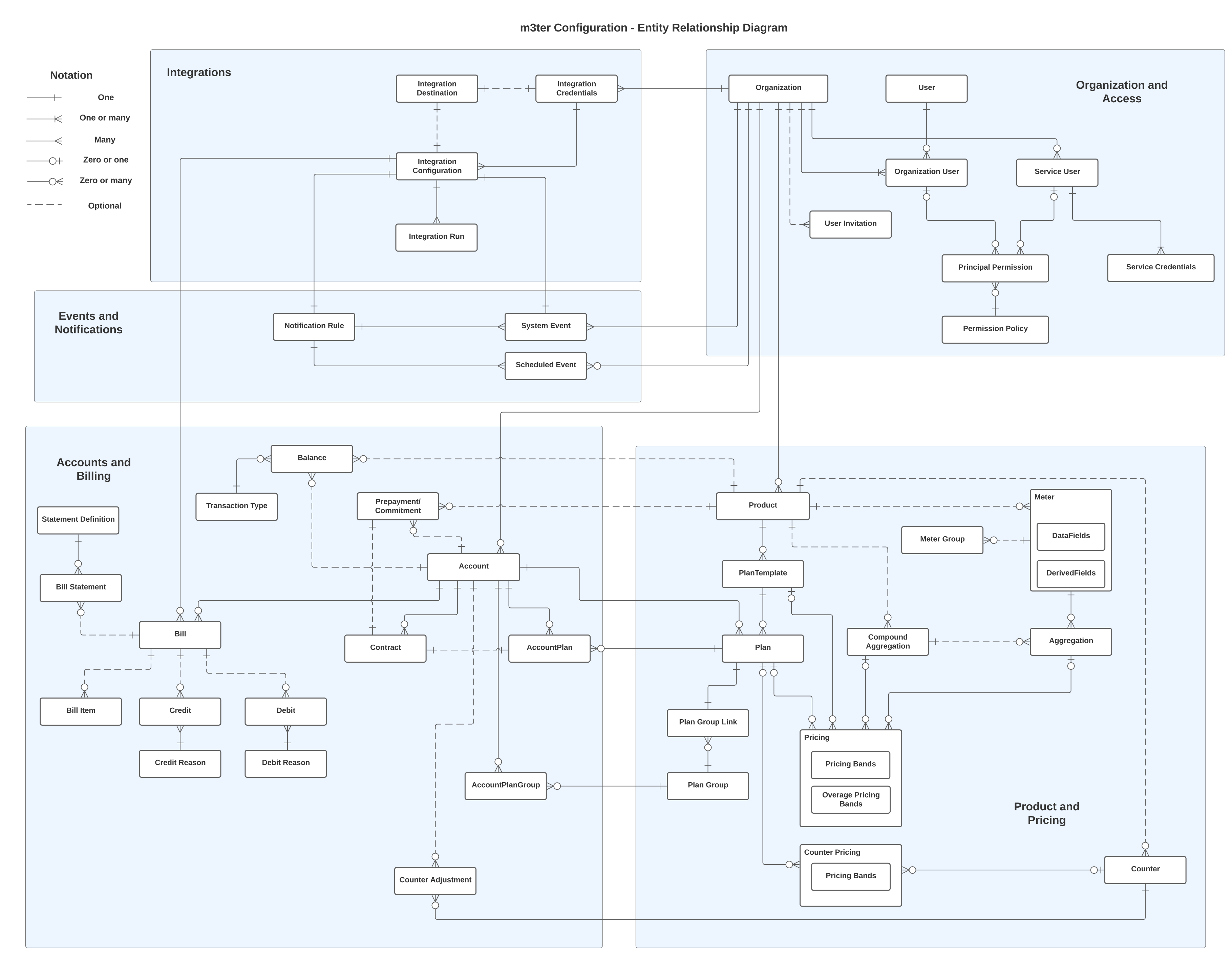
The following diagram shows the main configuration entities of the m3ter platform and their relationships:
* Click the diagram to open it in a separate tab and use the browser zoom to view.
* See below for section summaries and links to relevant documentation.
 ## Organization and Access
An *Organization* represents your company as a direct customer of m3ter. An Organization offers many settings that are applied generally and ensure key areas such as billing fulfill your specific requirements.
m3ter supports two types of user that can authenticate and be *granted access* to your Organization:
* **Users**. Represent the *people* you’ll grant access to your Organization.
* **Service Users**. Intended to represent *automated processes* that you want to grant direct API access to your Organization. You'll typically want to set up Service Users for integrations of your 3rd-party systems with the m3ter platform.
Using **Permission Policies**, you can then control what individual Users and Service Users are authorized to do when they have gained access to your Organization.
**More Details?** See the [Organization and Access Management](/guides/organization-and-access-management) section.
## Product and Pricing
*Products* in m3ter to represent the products and services you offer to your end customers. Once you have created a Product, to enable pricing for it you can then:
* Create **Meters** to collect Product usage data.
* Create and configure **Aggregations** that target Meter data fields and define usage-based pricing metrics as units of aggregated usage.
* Create **Counters** to apply unit-based pricing for recurring subscription charges.
* Set up Product **Plans** and apply **Pricing** to those Plans using your pricing metrics.
**More Details?** See the following sections:
* [Creating Products](/guides/creating-and-managing-products)
* [Usage Date: Meters](/guides/usage-data-meters)
* [Pricing Metrics: Aggregations](/guides/usage-data-aggregations)
* [Creating Counters and Pricing Plans](/guides/recurring-charges-counters/creating-counters)
* [Plans and Pricing](/guides/plans-and-pricing)
## Accounts and Billing
An *Account* is used to define one of your end-customers. You can attach a priced Product Plan to an Account and create an **Account Plan**, which is used at *billing* to determine the charges due for any:
* Product usage consumed by the Account in the billing period.
* Counter units subscribed to by the Account for the billing period.
**Bills** are generated according to the configured billing frequency and can be quickly integrated with your external account receivable systems.
**Bill Statements** can be generated for an Account to provide a customized breakdown of the Bill by metered dimensions. These act as helpful backing sheets to invoices sent to your end-customers and are based on a **Statement Definition** you have set up either for your Organization as a whole or for particular Accounts.
**More Details?**
* See the following sections in the main documentation:
* [End-Customer Accounts](/guides/end-customer-accounts)
* [Running, Viewing, and Managing Bills](/guides/billing-and-usage-data/running-viewing-and-managing-bills)
* [Working with Bill Statements](/guides/billing-and-usage-data/running-viewing-and-managing-bills/working-with-bill-statements)
## Integrations
Use m3ter Integrations to quickly map and synchronize data held in any 3rd-party systems you use for core business operations, such as sales, pricing, billing and invoicing, and general finance:
* Map and synchronize data held in leading Finance, CRM, and CPQ systems.
* Self-serve Integrations and set them up directly in the m3ter Console for outbound billing flows into your preferred invoicing system.
**More Details?** See the following sections:
* [Integrations](/guides/integrations)
* [Setting Up and Managing Integrations](/guides/integrations/setting-up-integrations)
## Events and Notifications
m3ter's *Events and Notifications* feature allows you to define and implement **Notifications** that are triggered by specific **Events** in your m3ter production environment:
* Set up a **Notification Rule** that references a **System Event** or a **Scheduled Event**.
* Include a calculation for the Notification Rule that references the Event's fields to define the precise conditions for triggering the Notification.
* Configure a webhook as **Destination** for the Notification payload to be delivered to.
**More Details?** See the [Utilizing Events and Notifications](/guides/alerts-events-and-notifications/utilizing-events-and-notifications) section.
## Organization and Access
An *Organization* represents your company as a direct customer of m3ter. An Organization offers many settings that are applied generally and ensure key areas such as billing fulfill your specific requirements.
m3ter supports two types of user that can authenticate and be *granted access* to your Organization:
* **Users**. Represent the *people* you’ll grant access to your Organization.
* **Service Users**. Intended to represent *automated processes* that you want to grant direct API access to your Organization. You'll typically want to set up Service Users for integrations of your 3rd-party systems with the m3ter platform.
Using **Permission Policies**, you can then control what individual Users and Service Users are authorized to do when they have gained access to your Organization.
**More Details?** See the [Organization and Access Management](/guides/organization-and-access-management) section.
## Product and Pricing
*Products* in m3ter to represent the products and services you offer to your end customers. Once you have created a Product, to enable pricing for it you can then:
* Create **Meters** to collect Product usage data.
* Create and configure **Aggregations** that target Meter data fields and define usage-based pricing metrics as units of aggregated usage.
* Create **Counters** to apply unit-based pricing for recurring subscription charges.
* Set up Product **Plans** and apply **Pricing** to those Plans using your pricing metrics.
**More Details?** See the following sections:
* [Creating Products](/guides/creating-and-managing-products)
* [Usage Date: Meters](/guides/usage-data-meters)
* [Pricing Metrics: Aggregations](/guides/usage-data-aggregations)
* [Creating Counters and Pricing Plans](/guides/recurring-charges-counters/creating-counters)
* [Plans and Pricing](/guides/plans-and-pricing)
## Accounts and Billing
An *Account* is used to define one of your end-customers. You can attach a priced Product Plan to an Account and create an **Account Plan**, which is used at *billing* to determine the charges due for any:
* Product usage consumed by the Account in the billing period.
* Counter units subscribed to by the Account for the billing period.
**Bills** are generated according to the configured billing frequency and can be quickly integrated with your external account receivable systems.
**Bill Statements** can be generated for an Account to provide a customized breakdown of the Bill by metered dimensions. These act as helpful backing sheets to invoices sent to your end-customers and are based on a **Statement Definition** you have set up either for your Organization as a whole or for particular Accounts.
**More Details?**
* See the following sections in the main documentation:
* [End-Customer Accounts](/guides/end-customer-accounts)
* [Running, Viewing, and Managing Bills](/guides/billing-and-usage-data/running-viewing-and-managing-bills)
* [Working with Bill Statements](/guides/billing-and-usage-data/running-viewing-and-managing-bills/working-with-bill-statements)
## Integrations
Use m3ter Integrations to quickly map and synchronize data held in any 3rd-party systems you use for core business operations, such as sales, pricing, billing and invoicing, and general finance:
* Map and synchronize data held in leading Finance, CRM, and CPQ systems.
* Self-serve Integrations and set them up directly in the m3ter Console for outbound billing flows into your preferred invoicing system.
**More Details?** See the following sections:
* [Integrations](/guides/integrations)
* [Setting Up and Managing Integrations](/guides/integrations/setting-up-integrations)
## Events and Notifications
m3ter's *Events and Notifications* feature allows you to define and implement **Notifications** that are triggered by specific **Events** in your m3ter production environment:
* Set up a **Notification Rule** that references a **System Event** or a **Scheduled Event**.
* Include a calculation for the Notification Rule that references the Event's fields to define the precise conditions for triggering the Notification.
* Configure a webhook as **Destination** for the Notification payload to be delivered to.
**More Details?** See the [Utilizing Events and Notifications](/guides/alerts-events-and-notifications/utilizing-events-and-notifications) section.