This topic explains how to create Integration Credentials which you can use to connect your Stripe Integrations in m3ter with your Stripe system. See Configuring Stripe Integrations.
Tip: Stripe or Stripe (Test Mode)? The steps to create a Credential for authenticating an integration with your Stripe test environment are the same, except you’ll need to select Stripe (Test Mode) as the destination.
- Select Integrations:
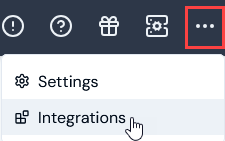 The Integrations page opens.
-
Select Stripe. The Stripe Integrations page opens.
-
On the Credentials panel, select Configure new credentials:
 The Create pages opens.
- Under Credential details enter:
- Name. Descriptive name for the Credential.
- Destination. This will be pre-selected for Stripe.
When you enter a name, the form adjusts to show an information panel under Destination, which advises you that you’ll need to provide authentication details on the Stripe website.
-
Select Go to Stripe. Under Get started with Stripe, log into your Stripe account and approve access for m3ter.
-
Select the Return to m3ter link at the left-hand side to be taken back to Create page.
-
Select Create credential. You are returned to the Stripe Integrations page where the new Credential is listed on the Credentials panel:
Warning: Authentication with Stripe not completed! If you fail to complete authentication with your Stripe instance promptly, a time-to-live (TTL) of ten minutes is imposed after which the Credential is removed and you’ll have to start again. If you return to the Stripe Integrations page within that TTL, any Credentials waiting for authentication completion will have a suffix of “Incomplete” attached, such as: Stripe Credential 1 (Incomplete).

