> ## Documentation Index
> Fetch the complete documentation index at: https://docs.m3ter.com/llms.txt
> Use this file to discover all available pages before exploring further.
# Mapping Segment Attributes for Pricing
The m3ter platform supports *Segmented Aggregations*, which allow you to segment the usage data collected by a single Meter. Segmented Aggregations are very useful for implementing certain pricing and billing use cases because you can then apply a different pricing to each of the defined segments.
The m3ter Connector for Salesforce managed package supports the mapping of Segment Attributes from your Salesforce Org onto m3ter pricing set up for Segmented Aggregations.
This topic explains how to enable and work with the mapping segment attributes on pricing feature:
* [Overview](/guides/m3ter-connector-for-salesforce/mapping-segment-attributes-for-pricing#overview)
* [Enabling Mapping Segment Attributes](/guides/m3ter-connector-for-salesforce/mapping-segment-attributes-for-pricing#enabling-mapping-segment-attributes)
* [Notes and Limitations](/guides/m3ter-connector-for-salesforce/mapping-segment-attributes-for-pricing#notes-and-limitations)
**Important!**
* **Check Version**. The mapping segment attributes for pricing feature is only available in version **0.8** and above of the m3ter Connector for Salesforce managed package. See [m3ter Connector for Salesforce - Changelog](/guides/m3ter-connector-for-salesforce/m3ter-connector-for-salesforce-changelog) for details on how to check your current installed version.
* **Working with Segmented Aggregation in m3ter**. If you enable and plan to use the mapping segment attributes on pricing feature in your m3ter Salesforce Connector managed package, we *strongly recommend* that you first review the [Segmented Aggregations](/guides/usage-data-aggregations/segmented-aggregations) topic in our user documentation.
## Overview
The mapping of segment attributes on m3ter pricing feature is built on top of the existing custom metadata framework developed for the m3ter Connector.
A new attribute added to the Custom Metadata Types (CMDT) framework supports a "Segments Field" in the `PricingMapping_mdt` and is designed to reference fields from the `PricingObject` specified in the metadata definition. This attribute is a Long Text Area and is used to store a JSON representation of key/value pairs that the user defines. Once this data is on the CMDT, the Sync Orchestration logic can make use of these fields and include them in the payload sent to m3ter.
## Enabling Mapping Segment Attributes
**To enable mapping of segment attributes:**
1. In your Salesforce Org, navigate to the **m3ter Admin** app.
2. Under **Setup**, select the **Segments** tab:
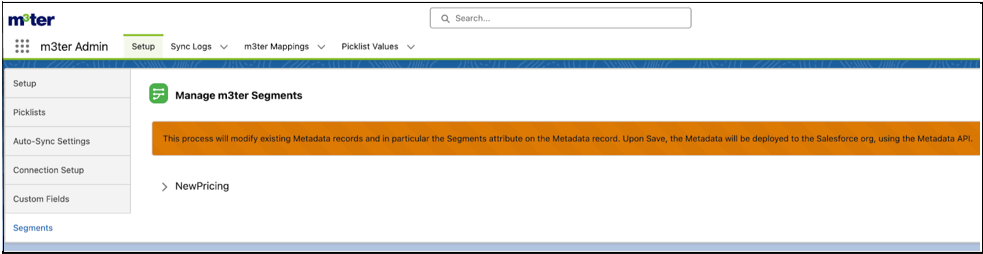 * The page queries all CMDT types that have the field `Segments__c` defined for a given Custom Metadata Type. As of 2nd June 2025, this feature is only available for the Pricing sync:
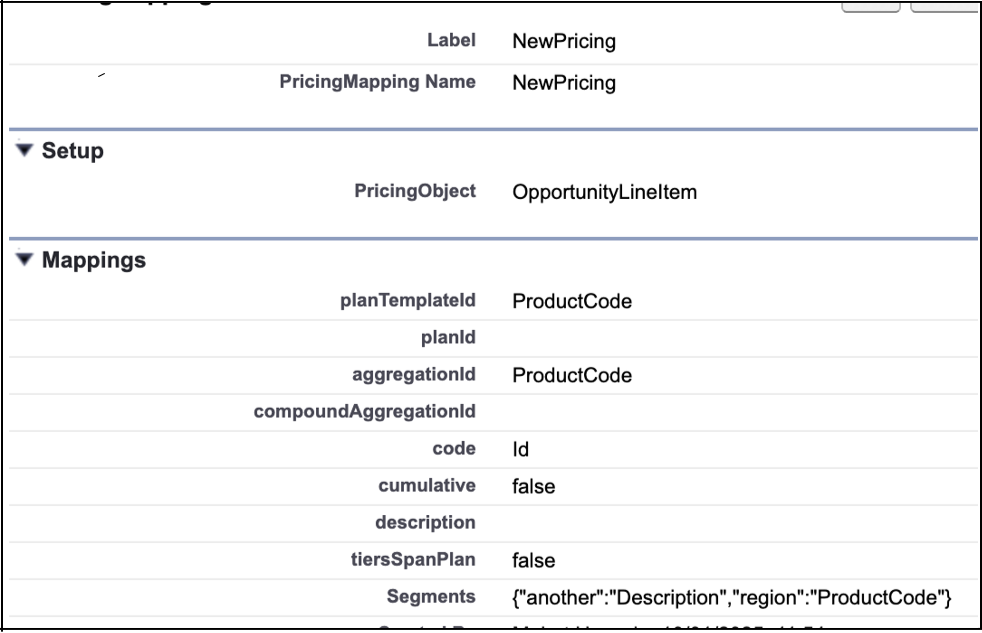 * Note that following the same pattern for how the m3ter Connector for SalesForce supports [Custom Fields](/guides/m3ter-connector-for-salesforce/mapping-custom-fields-on-m3ter-entities), there is a Long Text Area field added to `PricingMapping__mdt` for **Segments**.
3. Expand **NewPricing** on the **Segments** tab:
* Note that following the same pattern for how the m3ter Connector for SalesForce supports [Custom Fields](/guides/m3ter-connector-for-salesforce/mapping-custom-fields-on-m3ter-entities), there is a Long Text Area field added to `PricingMapping__mdt` for **Segments**.
3. Expand **NewPricing** on the **Segments** tab:
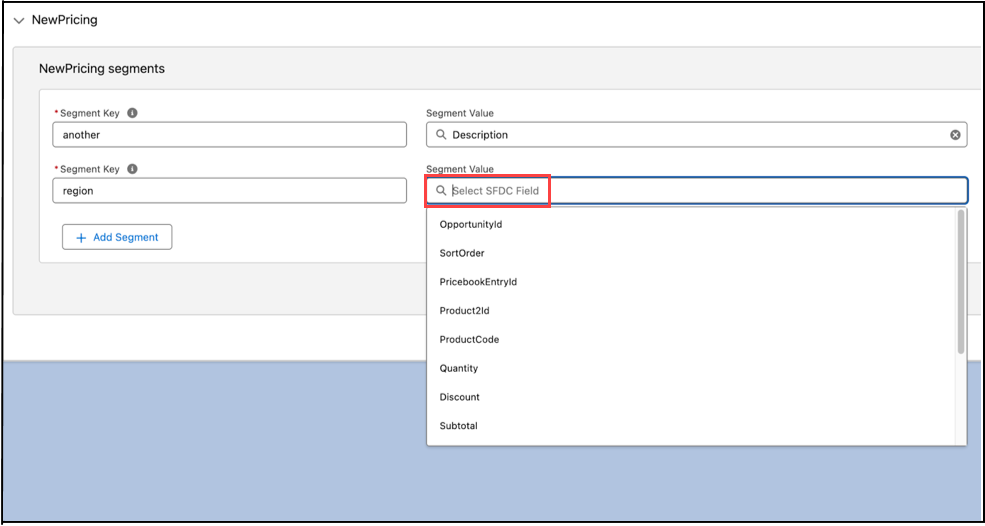
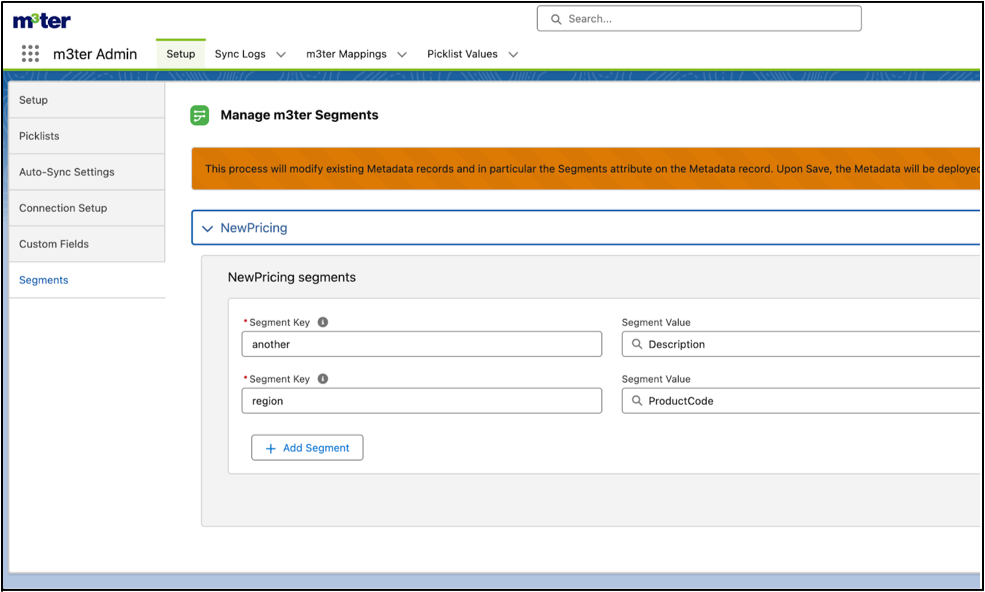 4. Use the **NewPricing** panel to define segment attributes that should be sent to m3ter. This configuration set up includes selecting a Salesforce **SFDC Field** to serve as the source for the attribute's value:
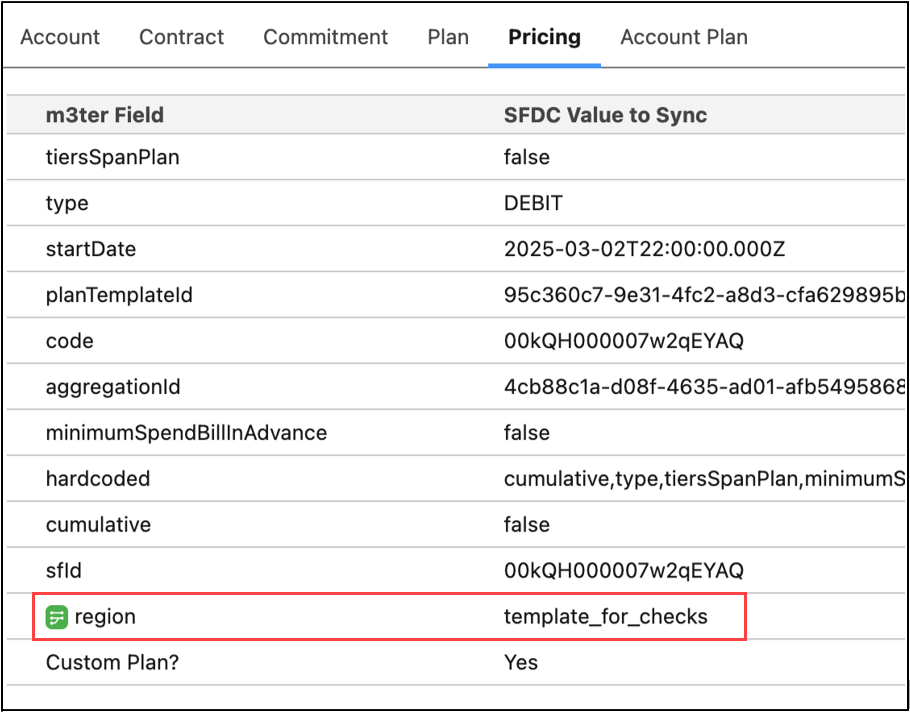
 * Note that for improved usability and to aid identification, the Sync Record component now highlights mapped attributes for Segments using a green icon:
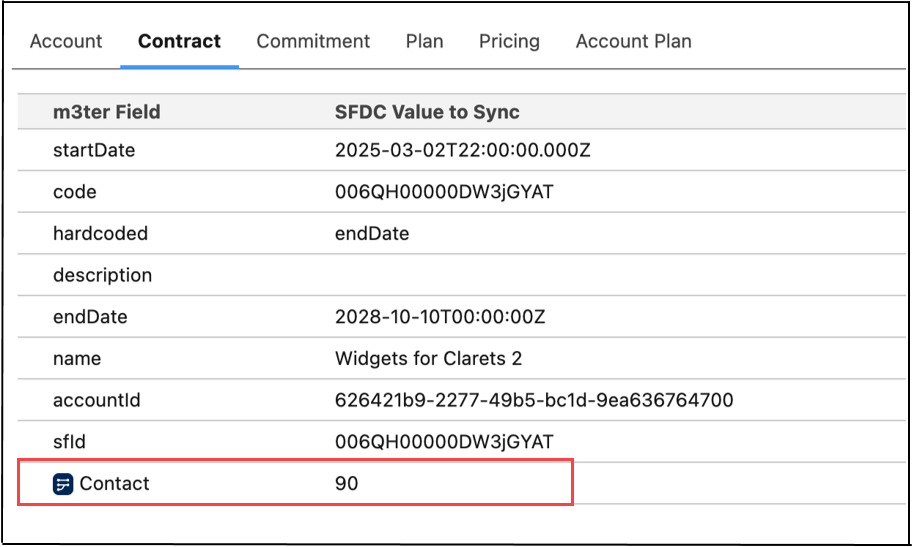
 * For Custom Fields using a dark blue icon:
 ## Notes and Limitations
### Field Reference Constraints
The available fields for segment values are constrained by the `PricingObject` defined in the `PricingMapping__mdt` record.
#### PricingObject Context
The `PricingObject` field - for example `OpportunityLineItem` in the following screenshot - determines which of the object's fields can be referenced:
* Only fields accessible from this object context can be used in segment values
* For example, if `PricingObject` is `OpportunityLineItem`, then fields like `OpportunityLineItem.Region__c` or fields from related objects like `Opportunity.Account.Region__c` would be valid.
#### Field Accessibility
* Standard and custom fields from the `PricingObject` are supported.
* Related object fields are supported through relationship notation - for example `Opportunity.Type`.
* Field-level security and object permissions are respected during resolution.
#### Reference Syntax
* For direct fields on the `PricingObject`, use just the field API name - for example `Region__c`.
* For related object fields, use relationship notation - for example `Opportunity.Account.Region__c`.
* Static values can be used directly without any special notation.
The format follows these additional rules:
* Each segment is a key-value pair separated by a colon.
* Multiple segments are separated by commas.
* Whitespace around keys and values is automatically trimmed.
* Invalid formats - such as missing colon or empty values - are ignored.
* Field references that don't exist on the `PricingObject` will cause validation errors.
* The field is optional and can be left empty.
### Support for Wildcards
In m3ter, when defining pricing for Segmented Aggregations, you can use wildcards to apply default pricing to unspecified segment combinations.
This is achieved by omitting certain fields in the segment object of your API request. In the m3ter Connector for SalesForce, no extra logic with respect to wildcards is needed. The Connector should be acting as a passthru and let the m3ter platform handle wildcards in segments - see [Segmented Aggregations - m3ter Documentation](/guides/usage-data-aggregations/segmented-aggregations#using-wildcards-order-of-evaluation) for details.
## Notes and Limitations
### Field Reference Constraints
The available fields for segment values are constrained by the `PricingObject` defined in the `PricingMapping__mdt` record.
#### PricingObject Context
The `PricingObject` field - for example `OpportunityLineItem` in the following screenshot - determines which of the object's fields can be referenced:
* Only fields accessible from this object context can be used in segment values
* For example, if `PricingObject` is `OpportunityLineItem`, then fields like `OpportunityLineItem.Region__c` or fields from related objects like `Opportunity.Account.Region__c` would be valid.
#### Field Accessibility
* Standard and custom fields from the `PricingObject` are supported.
* Related object fields are supported through relationship notation - for example `Opportunity.Type`.
* Field-level security and object permissions are respected during resolution.
#### Reference Syntax
* For direct fields on the `PricingObject`, use just the field API name - for example `Region__c`.
* For related object fields, use relationship notation - for example `Opportunity.Account.Region__c`.
* Static values can be used directly without any special notation.
The format follows these additional rules:
* Each segment is a key-value pair separated by a colon.
* Multiple segments are separated by commas.
* Whitespace around keys and values is automatically trimmed.
* Invalid formats - such as missing colon or empty values - are ignored.
* Field references that don't exist on the `PricingObject` will cause validation errors.
* The field is optional and can be left empty.
### Support for Wildcards
In m3ter, when defining pricing for Segmented Aggregations, you can use wildcards to apply default pricing to unspecified segment combinations.
This is achieved by omitting certain fields in the segment object of your API request. In the m3ter Connector for SalesForce, no extra logic with respect to wildcards is needed. The Connector should be acting as a passthru and let the m3ter platform handle wildcards in segments - see [Segmented Aggregations - m3ter Documentation](/guides/usage-data-aggregations/segmented-aggregations#using-wildcards-order-of-evaluation) for details.